
Fujifilm EXIF Frames: Display Camera and Recipe Metadata
Learn when Fujifilm EXIF Frames help a photograph: turn camera, lens, exposure and supported recipe metadata into a clear Metaframe in Receptree Studio.
 Receptree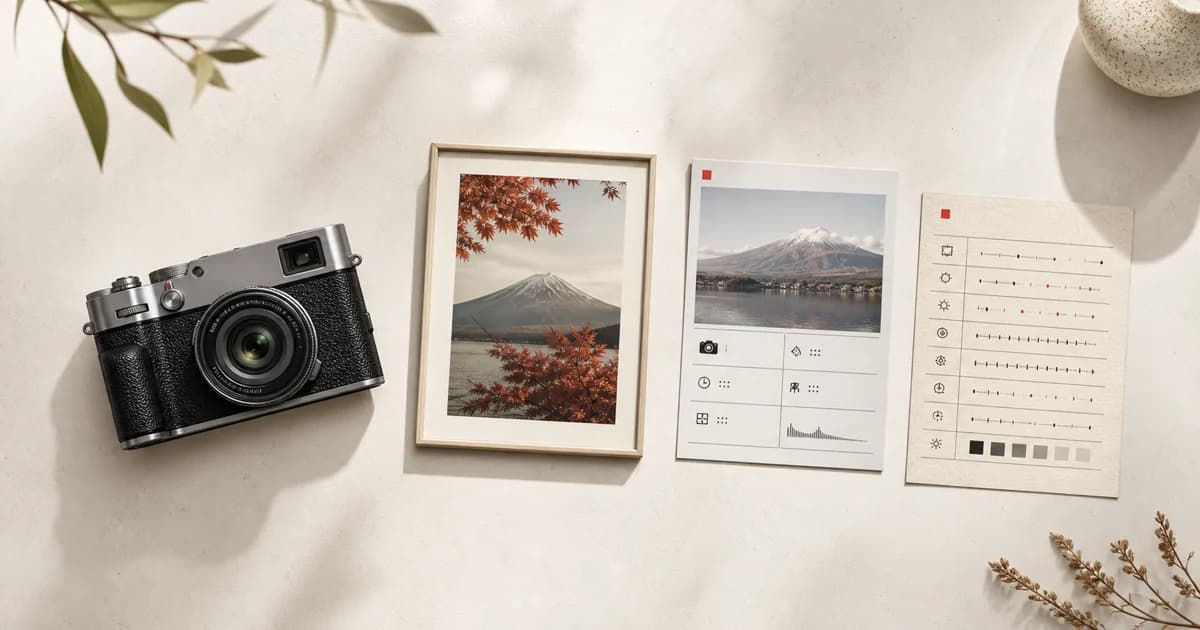
Applies to: Written for Fujifilm photographers. Camera menu names, film simulations and available settings vary by model and firmware.
What is a Fujifilm EXIF Frame?
A Fujifilm EXIF Frame, called a Metaframe in Receptree Studio, combines a photograph with the camera information that helps explain it. Depending on the source file, that can include the camera body, lens, focal length, aperture, shutter speed, ISO, date and supported Fujifilm recipe metadata. It is a presentation format, not a claim that metadata makes the photograph. Use it when those details add a useful layer of context for a portfolio post, travel sequence or personal record.
Choose the right photograph first
Start with an image that can hold attention before any information is added. A Metaframe should support the photograph rather than compensate for a weak one. Select the final frame, consider the intended crop and decide which metadata genuinely belongs with it. A quiet landscape may benefit from a lens and exposure note; a recipe test may benefit from showing supported camera settings; a casual social post may need much less information.
Check the imported data
Import the original or best available image into Receptree Studio and check the fields before you arrange the composition. Metadata can be incomplete after editing, export or social sharing, and different cameras record different fields. Keep missing information empty rather than filling it with a guess. When recipe metadata is present, confirm the values against the original recipe before treating the Metaframe as a reference for another photographer.
- Prefer an original camera file when the metadata matters.
- Review the camera, lens and exposure values before exporting.
- Use only checked recipe settings; a visual match cannot replace recorded metadata.
Let the hierarchy serve the image
Give the photograph the largest share of the composition and treat the metadata as a calm second layer. Choose a frame treatment with enough contrast and space for the information to remain readable at its intended size. The goal is not to display every possible field. A short, coherent set of details is more useful than a dense technical panel that competes with the picture.
Metaframe or Recipe Card?
Choose a Metaframe when the subject is one finished photograph and its capture context. Choose a Recipe Card when the subject is the repeatable Fujifilm look itself: film simulation, white balance, tones, grain and compatibility. The two formats can belong to the same project, but they answer different questions. One says how this picture was made; the other helps you recreate a checked recipe in a future situation.
Export for the way you will share it
Before exporting, read the finished Metaframe at the actual size you plan to post or print. Make sure the photo still leads, the fields are legible and the information is accurate. Keep the original separately and treat the export as a presentation copy. A clear EXIF frame makes it easier to remember the technical and creative context of a photograph without changing the photograph or the original file itself.